

Designing an Emotion State System for the Mochi Robot
Build a Mochi Robot emotion state machine for idle, listening, talking, happy, sad, thinking, and error states with replaceable animations.
Share
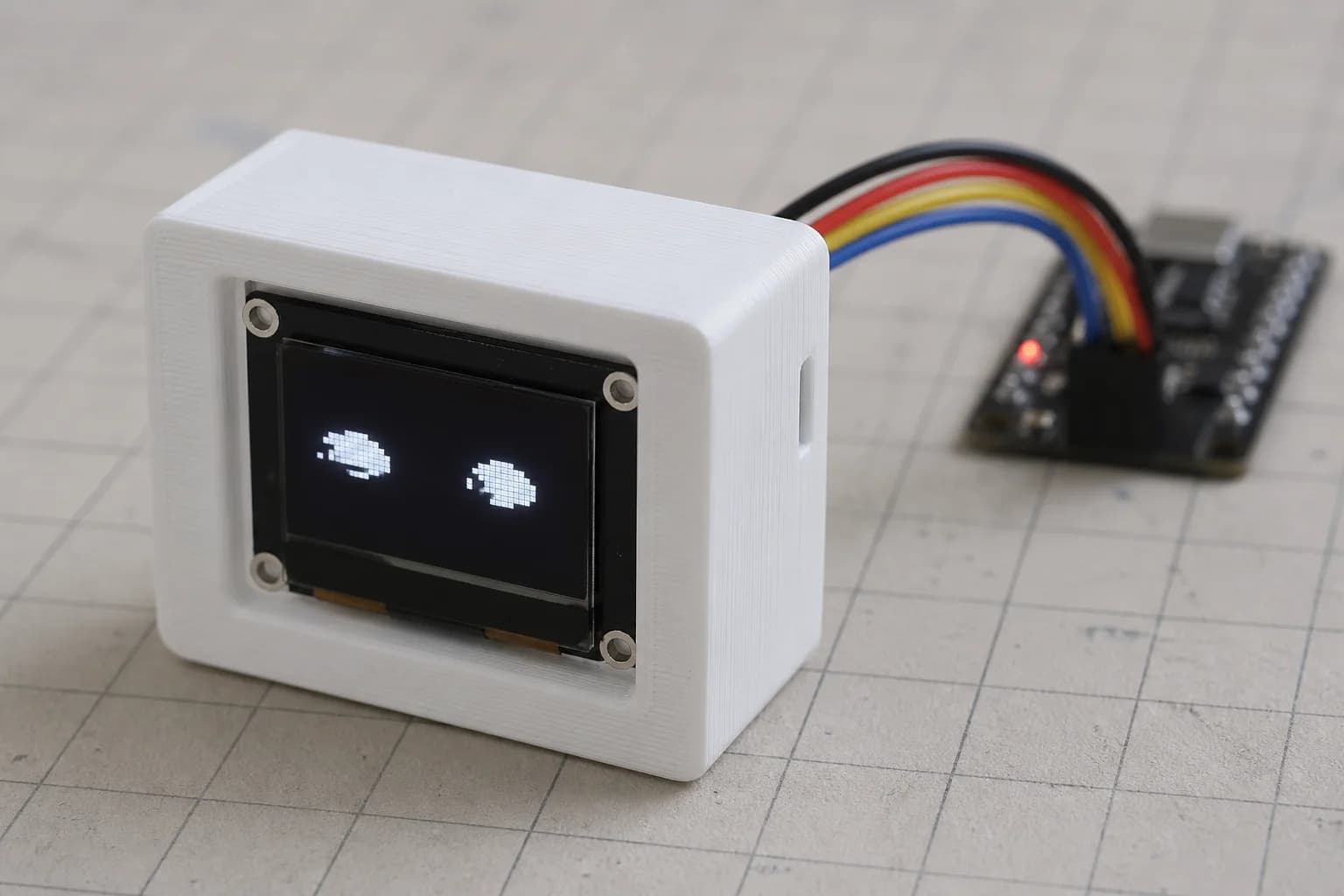
A robot face needs more than a good collection of expressions. It must choose the right one at the right moment and know when to leave it. If the microphone detects speech, a cloud request is still running, audio playback begins, and the battery monitor reports a fault, which expression should win?
The quickest prototype lets every subsystem call a function that swaps the current GIF. I can get a demo running that way, but it falls apart once callbacks arrive out of order, animations compete for the same widget, and application logic starts referring to asset filenames. A small state machine fixes most of this, provided one boundary stays firm: the state machine decides what Mochi is doing; the presentation layer decides how that state looks.
A four-layer architecture
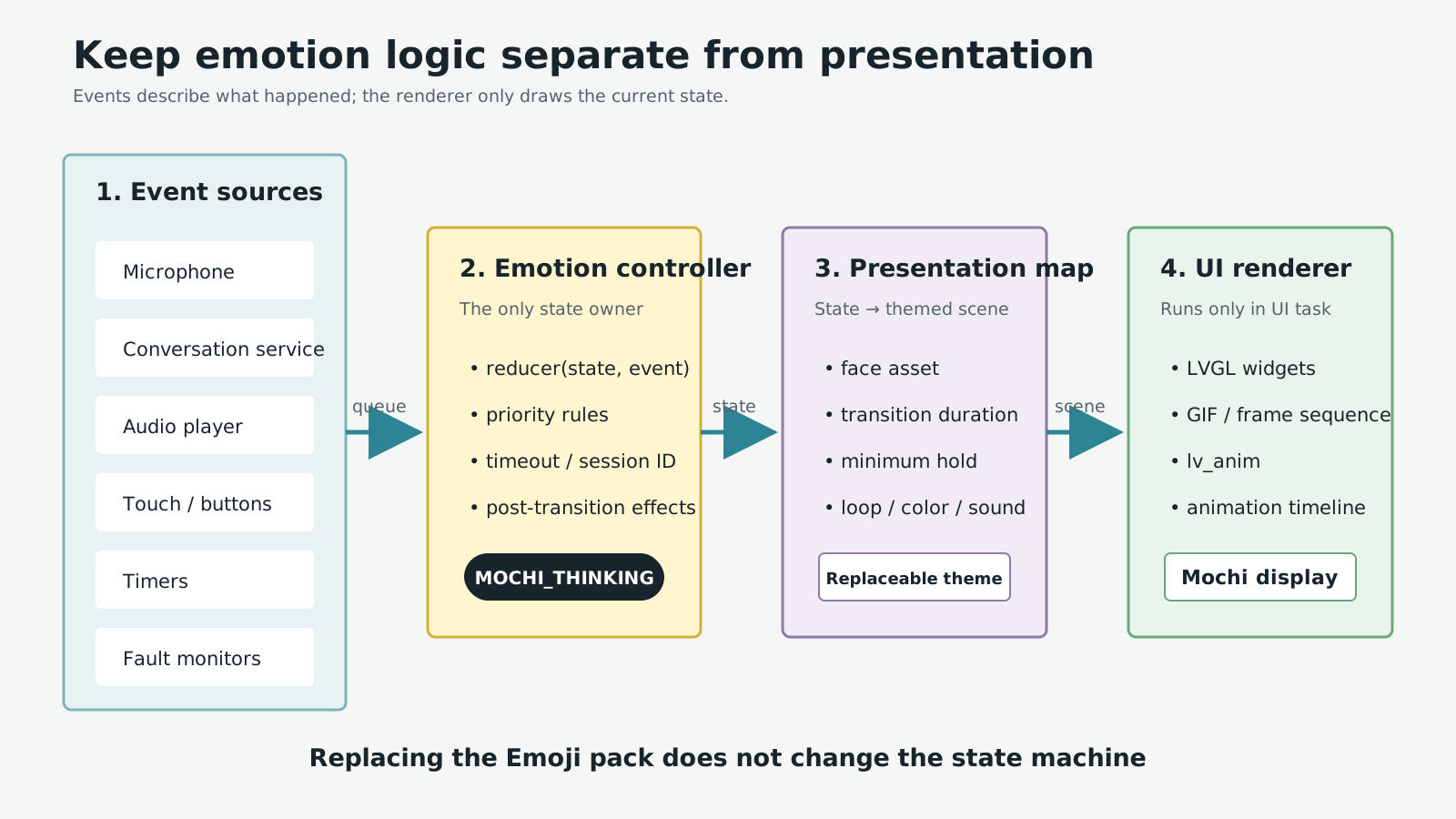
The application state remains independent from visual assets and animation mechanics.
The system can be divided into four layers:
- Event sources receive input from touch, the microphone, audio playback, conversation services, timers, and fault monitors.
- Emotion controller is the only component allowed to change the current emotional state.
- Presentation map converts a logical state into an
emotion_scene_t, including the face asset, blink rate, accent color, and optional sound cues. - Renderer runs in the UI context and controls LVGL widgets, GIFs, frame sequences, or animation timelines.
An event producer should never need to know which GIF is active. Likewise, the renderer should not care why Mochi entered THINKING. Keep that separation and you can replace an Emoji pack, switch from GIF to sprite sheets, or add a low-power theme without touching speech processing.
The seven core states
Start with a small, stable enum:
typedef enum {
    MOCHI_IDLE,
    MOCHI_LISTENING,
    MOCHI_THINKING,
    MOCHI_TALKING,
    MOCHI_HAPPY,
    MOCHI_SAD,
    MOCHI_ERROR,
} mochi_state_t;
Each state expresses an application-level meaning rather than a particular animation:
| State | Meaning | Typical exit |
|---|---|---|
IDLE | Ready with no primary activity | Voice, touch, or another new event |
LISTENING | Capturing speech or waiting for the utterance to end | End of speech, cancel, or timeout |
THINKING | Processing a request | Result, fault, or timeout |
TALKING | Playing a response | Playback completes or is interrupted |
HAPPY | Brief positive feedback | Expression duration expires |
SAD | Negative feedback that is not a system fault | Expression duration expires |
ERROR | A critical function cannot continue | Recovery succeeds or the user resets |
HAPPY and SAD are usually transient. They can return to IDLE, or to the previous state if the product needs a richer interaction model. Returning to IDLE is easier to reason about and test in the first firmware version.
Events are not states
A common mistake is turning every signal into a state: TOUCHING, WIFI_CONNECTED, or AUDIO_FINISHED. Most of these are events. An event happens at a moment in time; a state remains active over an interval.
typedef enum {
    EVT_WAKE_WORD,
    EVT_SPEECH_END,
    EVT_REPLY_READY,
    EVT_AUDIO_FINISHED,
    EVT_POSITIVE_FEEDBACK,
    EVT_NEGATIVE_FEEDBACK,
    EVT_TIMEOUT,
    EVT_FAULT,
    EVT_RECOVERED,
    EVT_CANCEL,
} mochi_event_type_t;

typedef struct {
    mochi_event_type_t type;
    uint32_t timestamp_ms;
    int32_t detail;
} mochi_event_t;
The detail field can hold a fault code or feedback level. For larger payloads, use a separate owned structure or a handle with explicit lifetime rules instead of placing a temporary pointer in the queue.
Transitions and priorities
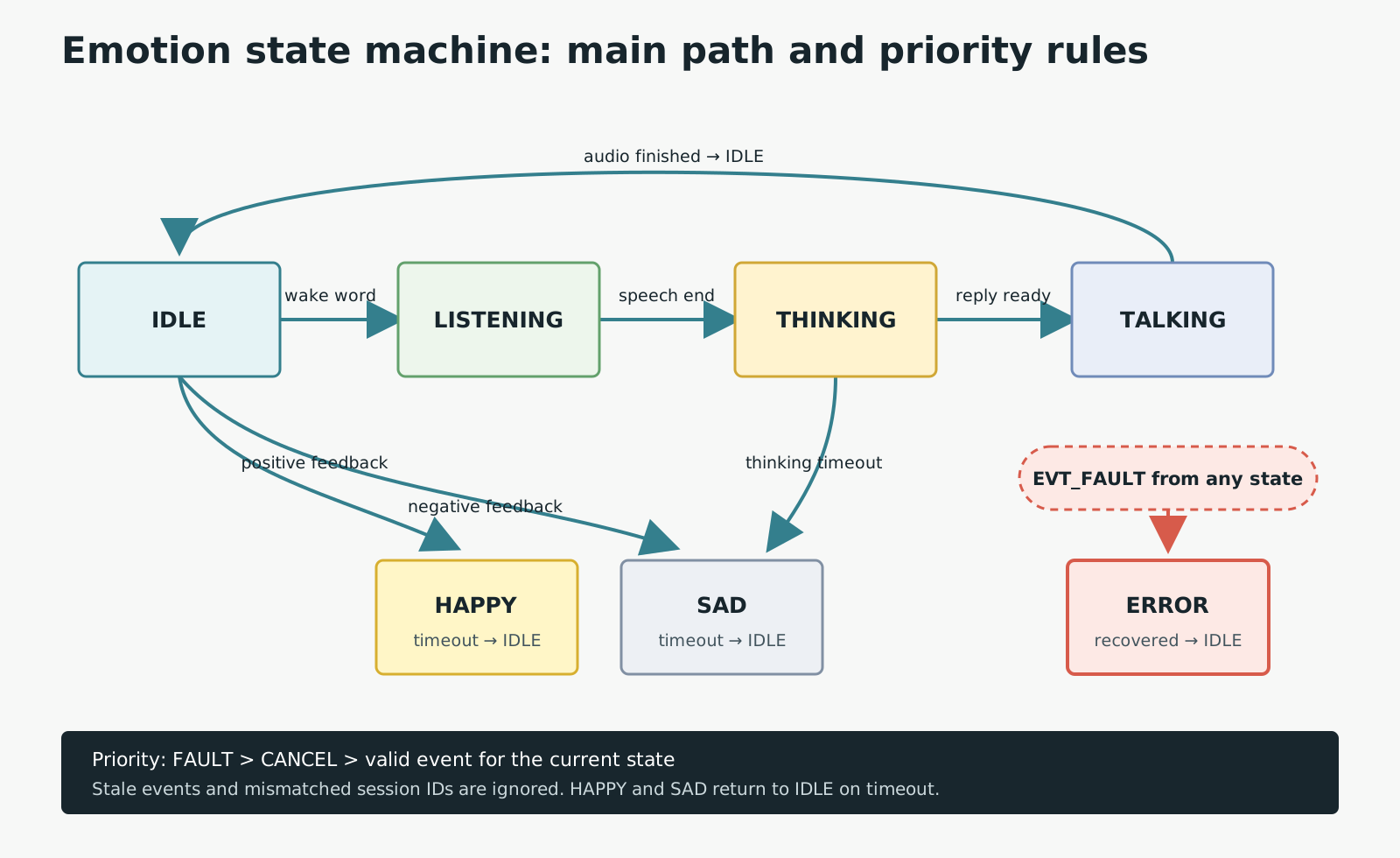
Temporary states return to idle on timeout; error has the highest priority and exits only after recovery.
Transitions are not equally important. A practical policy for Mochi is:
EVT_FAULThas the highest priority and can move any state toERROR.EVT_CANCELstops listening, thinking, or talking and returns toIDLE.- Completion events are valid only in their matching state.
EVT_AUDIO_FINISHED, for example, must not change the state once Mochi has already leftTALKING. HAPPYandSADhave deadlines and produceEVT_TIMEOUTwhen their display period ends.- Stale events are ignored when they belong to an interaction session that has been superseded.
The fifth rule prevents a subtle failure. Request A is canceled, request B starts, and then A's network callback arrives late. An event containing only EVT_REPLY_READY could make Mochi speak the wrong answer. A session_id in the event and controller context lets the reducer reject stale callbacks.
A reducer that is easy to test
Keep the state decision in a pure function: current state plus event produces the next state. It does not call LVGL, play audio, or start timers.
static mochi_state_t reduce_state(mochi_state_t current,
                                  const mochi_event_t *event)
{
    if (event->type == EVT_FAULT) return MOCHI_ERROR;
    if (event->type == EVT_CANCEL) return MOCHI_IDLE;

    switch (current) {
    case MOCHI_IDLE:
        if (event->type == EVT_WAKE_WORD) return MOCHI_LISTENING;
        if (event->type == EVT_POSITIVE_FEEDBACK) return MOCHI_HAPPY;
        if (event->type == EVT_NEGATIVE_FEEDBACK) return MOCHI_SAD;
        break;

    case MOCHI_LISTENING:
        if (event->type == EVT_SPEECH_END) return MOCHI_THINKING;
        if (event->type == EVT_TIMEOUT) return MOCHI_IDLE;
        break;

    case MOCHI_THINKING:
        if (event->type == EVT_REPLY_READY) return MOCHI_TALKING;
        if (event->type == EVT_TIMEOUT) return MOCHI_SAD;
        break;

    case MOCHI_TALKING:
        if (event->type == EVT_AUDIO_FINISHED) return MOCHI_IDLE;
        break;

    case MOCHI_HAPPY:
    case MOCHI_SAD:
        if (event->type == EVT_TIMEOUT) return MOCHI_IDLE;
        break;

    case MOCHI_ERROR:
        if (event->type == EVT_RECOVERED) return MOCHI_IDLE;
        break;
    }

    return current;
}
Only after the reducer returns a different state does the controller perform side effects: log the transition, update a deadline, send a UI command, or notify the audio task. This structure supports table-driven tests for every current + event pair, including events that should be ignored.
Keep animation packs replaceable
Do not place asset names in the reducer. Provide a replaceable presentation table instead:
typedef struct {
    const void *face_asset;
    uint16_t transition_ms;
    uint16_t minimum_hold_ms;
    bool loop;
} emotion_scene_t;

static const emotion_scene_t default_theme[] = {
    [MOCHI_IDLE]      = { &face_idle,      180, 0,    true  },
    [MOCHI_LISTENING] = { &face_listening, 120, 0,    true  },
    [MOCHI_THINKING]  = { &face_thinking,  160, 0,    true  },
    [MOCHI_TALKING]   = { &face_talking,   100, 0,    true  },
    [MOCHI_HAPPY]     = { &face_happy,     140, 1200, false },
    [MOCHI_SAD]       = { &face_sad,       180, 1400, false },
    [MOCHI_ERROR]     = { &face_error,      80, 0,    true  },
};
A second theme only needs another table with the same state coverage. On a flash-constrained board, face_asset might refer to a static icon. With PSRAM available, it may refer to a GIF or frame sequence. Conversation logic remains unchanged.
Use LVGL for presentation
LVGL animations change a value from a start point to an end point over time through a callback. They are well suited to fades, scaling, movement, brightness, and color transitions. An animation timeline is useful when an expression combines several coordinated motions, such as narrowing the eyes before revealing a smile.
The state controller should issue only ui_show_state(next_state). The UI function looks up the presentation map, removes conflicting animations on the same target, and starts the new scene. Never block while waiting for an animation to finish; use a completion callback to post an event only when the state machine genuinely needs that information.
As a practical rule, only the UI task should call LVGL APIs. Microphone, network, and timer callbacks post events rather than modifying widgets directly. This reduces races and keeps rendering order predictable.
Connect it with FreeRTOS
A FreeRTOS queue works well for passing small events between tasks and from interrupts to tasks. Queue items are copied, so a compact mochi_event_t has simple ownership and never depends on a producer's stack frame.
static QueueHandle_t emotion_queue;

void emotion_task(void *arg)
{
    mochi_event_t event;
    mochi_state_t state = MOCHI_IDLE;

    for (;;) {
        if (xQueueReceive(emotion_queue, &event, portMAX_DELAY) != pdTRUE) {
            continue;
        }

        mochi_state_t next = reduce_state(state, &event);
        if (next != state) {
            state = next;
            ui_command_t command = { .state = next };
            xQueueSend(ui_queue, &command, 0);
            update_state_deadline(next);
        }
    }
}
There is no need to create one task per state. One controller task and one UI task are normally enough for a small robot. A task notification is lighter when the signal is only a wake-up flag, but a queue scales more cleanly when messages carry a type, timestamp, fault code, and session ID.
Timeouts without visual thrashing
Mochi will feel erratic if expressions change too quickly. Add three controls early:
- Minimum hold keeps an expression visible for a few hundred milliseconds unless
ERRORorCANCELpreempts it. - Deadline limits
LISTENING,THINKING,HAPPY, andSAD, preventing a permanent stuck state. - Coalescing merges repetitive events such as audio levels or touch movement before they fill the queue.
A timer callback should not change state directly. It posts EVT_TIMEOUT with a generation or session ID. The controller accepts it only if the timeout still belongs to the current state.
Testing checklist
Before connecting real GIF assets, use a solid screen color or text label to verify the logic:
- Every state has a valid exit, especially
THINKINGandERROR. - An event arriving in the wrong state does not cause an unintended transition.
- Callbacks from an earlier session are ignored.
EVT_FAULTwins over ordinary events waiting in the queue.- A completed animation cannot pull the UI back to an old state.
- Replacing the entire presentation map does not change reducer tests.
- A full queue produces a log or metric instead of silently losing critical faults.
Once the state machine is stable, connect the final Emoji pack and tune durations. This keeps logic defects separate from asset and rendering problems, which are difficult to distinguish when both layers are developed at once.
Conclusion
Mochi's emotion system is firmware architecture, not merely a folder of GIFs. The state machine owns meaning and transition rules, the presentation map chooses a visual treatment, LVGL performs the motion, and FreeRTOS queues deliver events to the correct context. With those responsibilities separated, the robot is easier to extend and a new visual theme can genuinely be installed without rewriting the conversation flow.
References
Related reading
Share
Keep exploring
Read next
Related articles
Extending Battery Life in an ESP32 Robot with a Display
Analyze battery life for an ESP32 robot with a display: backlight, Wi-Fi, audio, peripherals, sleep modes, wake sources, and runtime.
First Notes On Firmware For Embedded Products
Early principles for firmware on a small embedded product: scope, module boundaries, logging, and handling errors without guessing.
Running Linux on ESP32-S31: What the MMU Changes
ESP32-S31 now has an official Linux BSP Developer Preview. Here is a practical look at its MMU, Buildroot, U-Boot, Linux 6.18, build flow, and the limits that still matter.