

Extending Battery Life in an ESP32 Robot with a Display
Analyze battery life for an ESP32 robot with a display: backlight, Wi-Fi, audio, peripherals, sleep modes, wake sources, and runtime.
Share
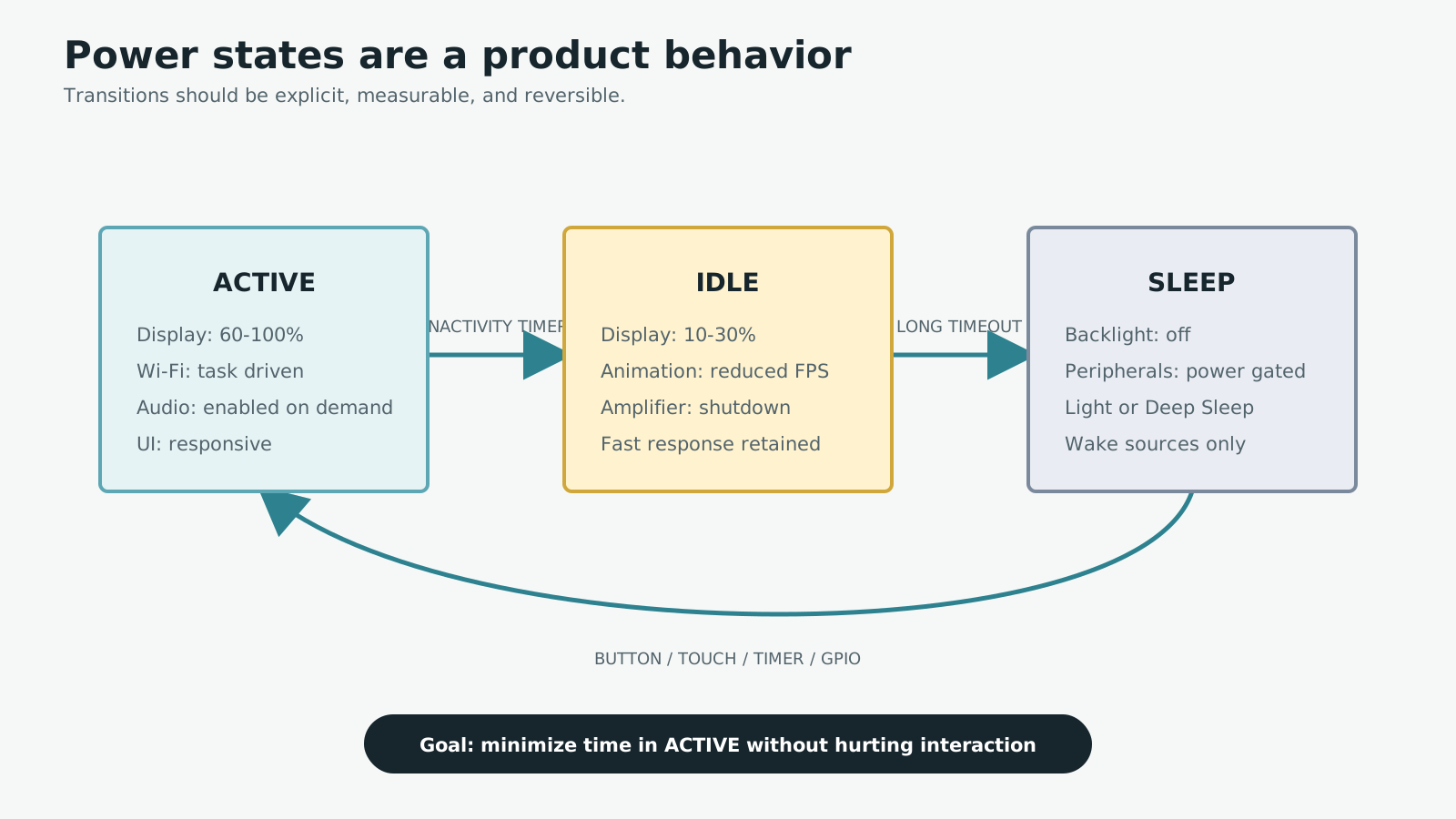
An ESP32, color display, Wi-Fi radio, and speaker can drain a small battery quickly when they remain active together. Increasing battery capacity helps, but it also adds volume, weight, charge time, and cost. A better design treats power as a system behavior shared by hardware, firmware, and the interaction state machine.
For a Mochi-style ESP32 robot with a display, I focus on one idea first: reduce how long each subsystem stays active, not only how many milliamps it draws while active. The sections below turn that idea into practical changes you can measure.
1. Identify the real power consumers
Start by finding where the energy actually goes. A typical screen-equipped ESP32 device includes several independent loads:
- ESP32 CPU and memory activity.
- Wi-Fi or Bluetooth radio operation.
- TFT backlight current.
- Audio amplifier and speaker output.
- Microphone, sensors, and status LEDs.
- Regulators, charger circuits, and other always-powered components.
Reference values can help with initial sizing, but they are not a substitute for measurement:
| Block | Typical behavior |
|---|---|
| Active ESP32-S3 | Often tens to more than 100mA, depending on workload |
| Wi-Fi traffic | Short, high-current transmit and receive bursts |
| TFT backlight | Roughly 20–100mA on many small modules |
| Audio amplifier | Depends strongly on supply, speaker, and volume |
| Sensors, microphone, LEDs | A few milliamps to tens of milliamps combined |
Do not add numbers from unrelated test conditions. An ESP32 current figure measured with Wi-Fi active may already include the radio. Measure the complete board in each product mode.
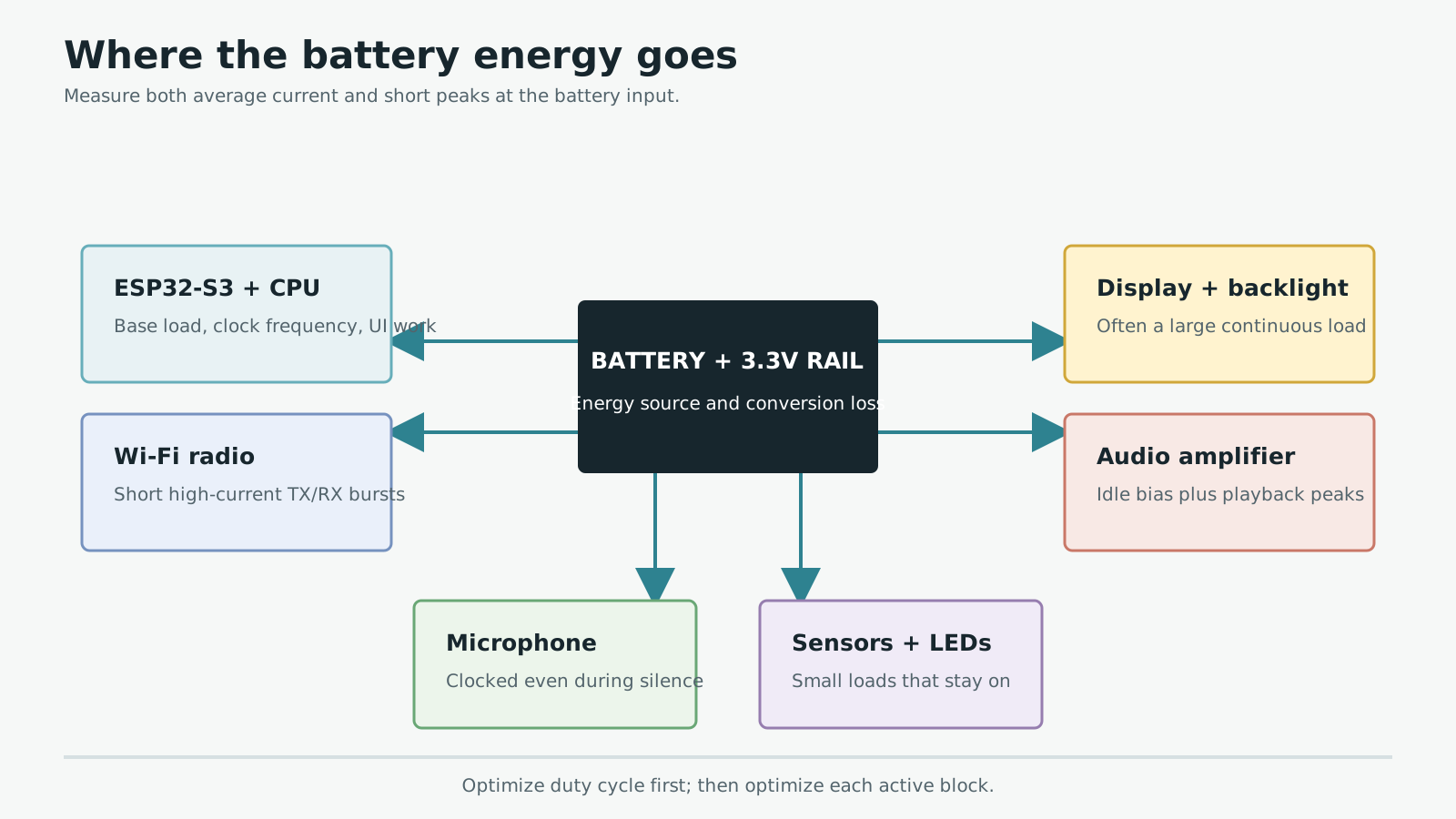
Whole-board measurement reveals which blocks actually dominate average and peak current.
2. Give the product explicit power states
The robot does not need every subsystem at full power all the time. A useful first model has three product states.
Active
The user is interacting with Mochi. The display is bright, the UI is responsive, and Wi-Fi, microphone, or speaker may be active. This is the highest-power state.
Idle
The user has paused briefly. Dim the display, reduce animation frame rate, shut down the amplifier, and sample sensors less frequently while preserving a fast response.
Sleep
The inactivity period is long enough to switch off the backlight and unnecessary peripheral rails. The ESP32 enters Light Sleep or Deep Sleep and keeps only the selected wake sources available.
The largest gain often comes from leaving Active early and waking only for useful work.
Use explicit events and timers for each transition. A touch, button, timer, or other meaningful event should wake the product. Background polling should not repeatedly drag it back into Active.
3. Dim and switch off the TFT backlight
On many TFT modules, the LED backlight is one of the largest continuous loads. A black screen does not save much backlight power because the LEDs remain energized behind the LCD panel.
Avoid wiring a substantial backlight directly to a GPIO. Use an appropriate transistor, MOSFET, or LED driver and control it through PWM. A simple state policy might be:
- Active: 60–100% duty cycle.
- Idle: 10–30% duty cycle.
- Sleep: backlight fully off.
Dropping from maximum brightness to a well-chosen mid level can reduce current significantly without making the interface feel dim. Apply a perceptual brightness curve if linear PWM steps look uneven to the eye.
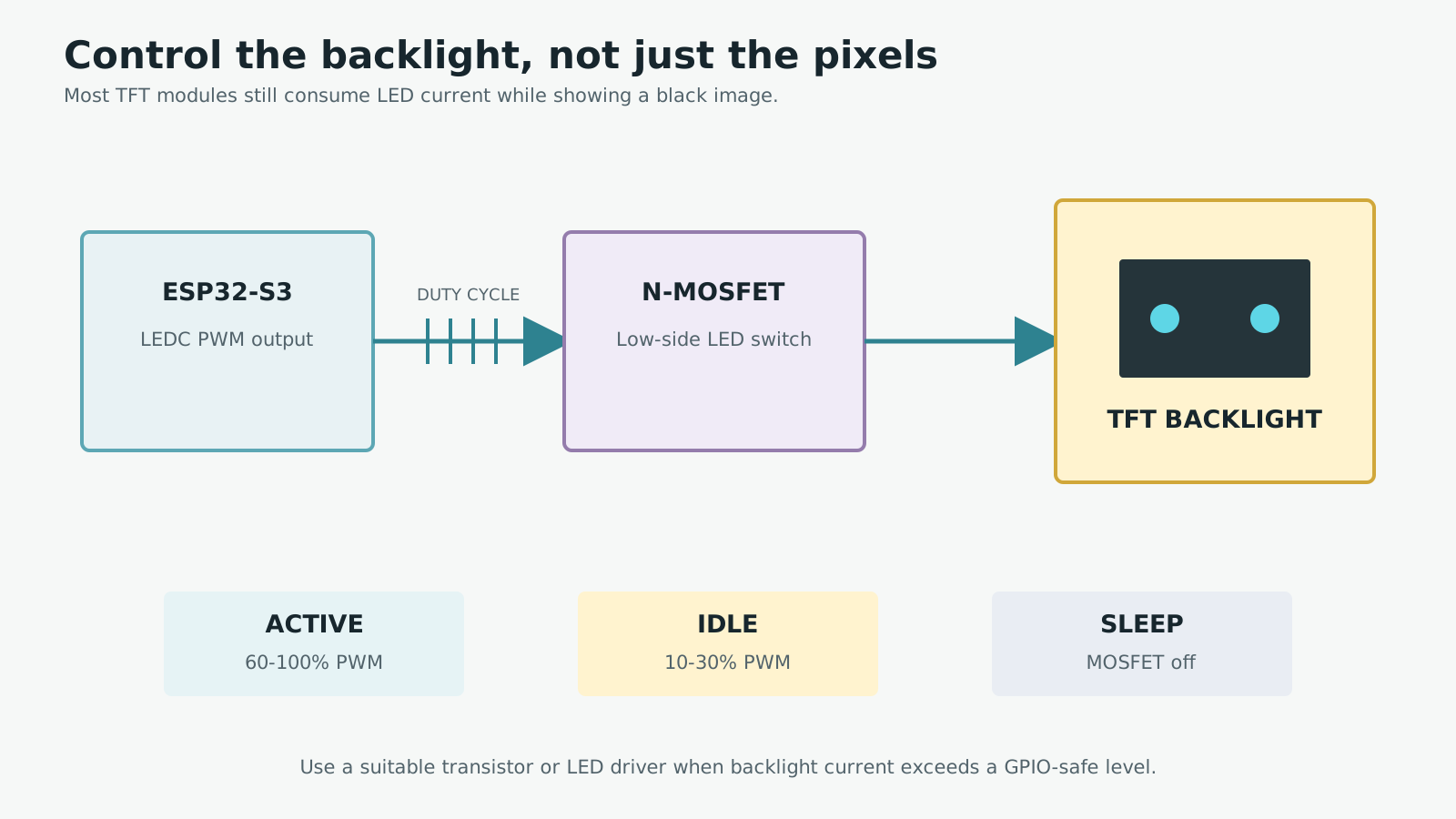
A black UI does not save TFT backlight power while the LEDs remain energized.
If the display controller itself draws meaningful standby current, switch its rail as well. Store or rebuild the UI state so wake-up does not expose corrupted frames.
4. Keep Wi-Fi active only when it creates value
Wi-Fi produces brief current peaks and can keep the CPU busy with network housekeeping. When continuous connectivity is unnecessary:
- Enable Wi-Fi only for synchronization or API calls.
- Batch several updates into one connection window.
- Send on state changes instead of polling every second.
- Increase refresh intervals for non-critical information.
- Stop Wi-Fi after the task completes.
For Mochi, online mode may be needed for a conversation API or configuration sync. An offline expression does not require the radio to remain active.
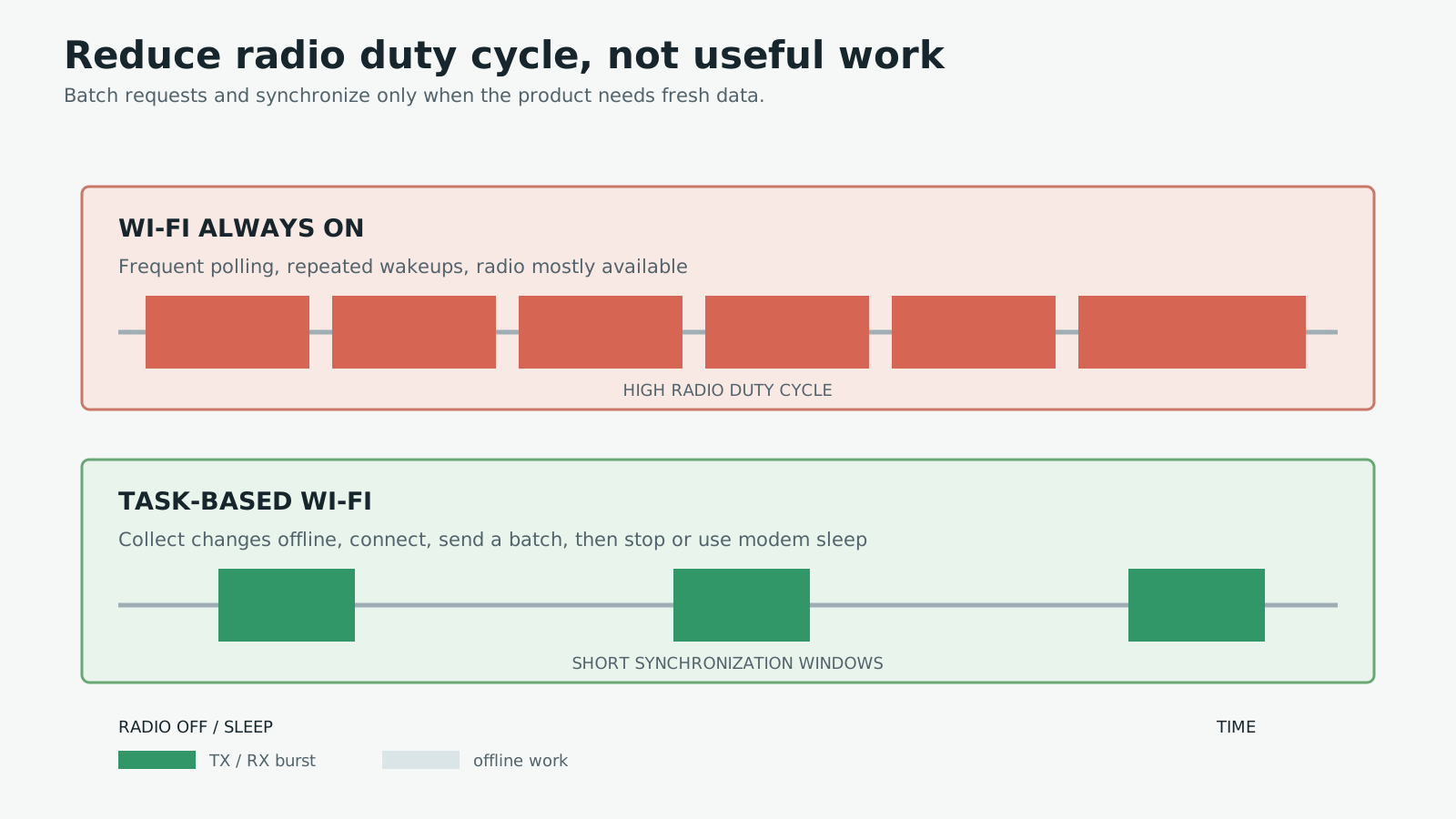
A lower radio duty cycle reduces average current while completing the same useful work.
Modem Sleep is different from stopping Wi-Fi. It lets the radio sleep between scheduled events while preserving the connection. Savings depend on the access point, listen interval, and background traffic. Frequent polling or broadcast traffic can erase much of the benefit.
ESP-IDF power management can scale CPU and APB frequency and coordinate automatic Light Sleep. Wi-Fi drivers hold and release power-management locks as needed; a forgotten lock elsewhere in the application can prevent the expected low-power behavior.
5. Shut the amplifier down between clips
An audio amplifier can consume idle current even when the speaker is silent. If it exposes EN, SHDN, or SD, connect that control to the ESP32 and follow the polarity and timing in the selected amplifier datasheet.
A safe playback sequence is:
- Enable the amplifier.
- Wait for its startup interval.
- Start the audio stream.
- Stop the stream cleanly.
- Disable the amplifier after its required hold time.
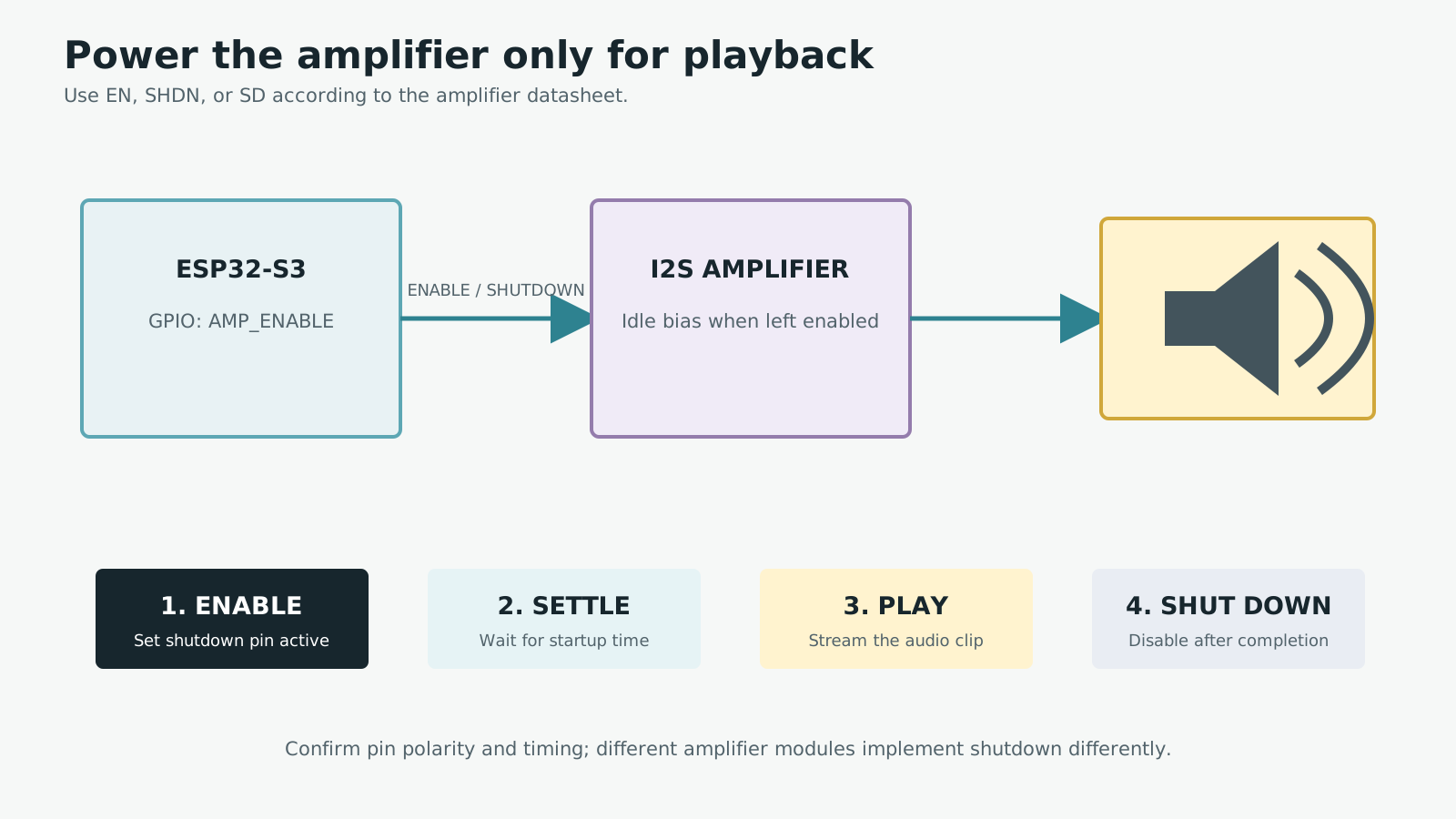
Shutdown control reduces idle current and can suppress speaker noise between clips.
This saves idle power and may reduce background hiss. It can also create pops if rail sequencing, I2S data, or shutdown polarity is wrong, so test the actual board rather than relying on a generic module example.
6. Reduce unnecessary display updates
Not every UI element needs 30 or 60 frames per second. Rendering less often reduces CPU work, memory traffic, and the amount of time power-management locks remain active.
- Redraw only when content changes.
- Lower animation frame rate in Idle.
- Pause GIFs that are not currently visible or meaningful.
- Update clocks and sensor values at an appropriate interval.
- Avoid several simultaneous effects when one communicates the state clearly.
With LVGL, avoid invalidating widgets when their data has not changed. A blink animation can run for a short sequence and stop rather than occupying the renderer continuously.
7. Match Modem Sleep, Light Sleep, and Deep Sleep to the workflow
These modes solve different problems.
Modem Sleep
Use Modem Sleep when the Wi-Fi connection must remain available. The CPU can continue running or use dynamic frequency scaling, while the radio sleeps between required network events.
Light Sleep
In Light Sleep, CPUs and most digital peripherals are clock-gated while RAM and execution state are retained. Wake-up is faster and execution resumes from where it paused. This works well for idle periods lasting seconds or minutes.
Automatic Light Sleep can be enabled with esp_pm_configure() when power management and FreeRTOS Tickless Idle are configured. It occurs only when no active power-management lock requires a higher frequency or prevents sleep. ESP-IDF lock profiling APIs are useful when expected sleep intervals never appear.
Deep Sleep
Deep Sleep powers off CPUs, most RAM, and APB-clocked digital peripherals. The RTC domain can retain selected state and wake logic, but normal firmware follows a reboot path after wake. It suits long inactive periods where reconnecting and rebuilding the UI is acceptable.
Wi-Fi and Bluetooth connections are not maintained by Light Sleep or Deep Sleep alone. If connectivity must remain alive, use the documented modem-sleep and automatic-sleep mechanisms instead.
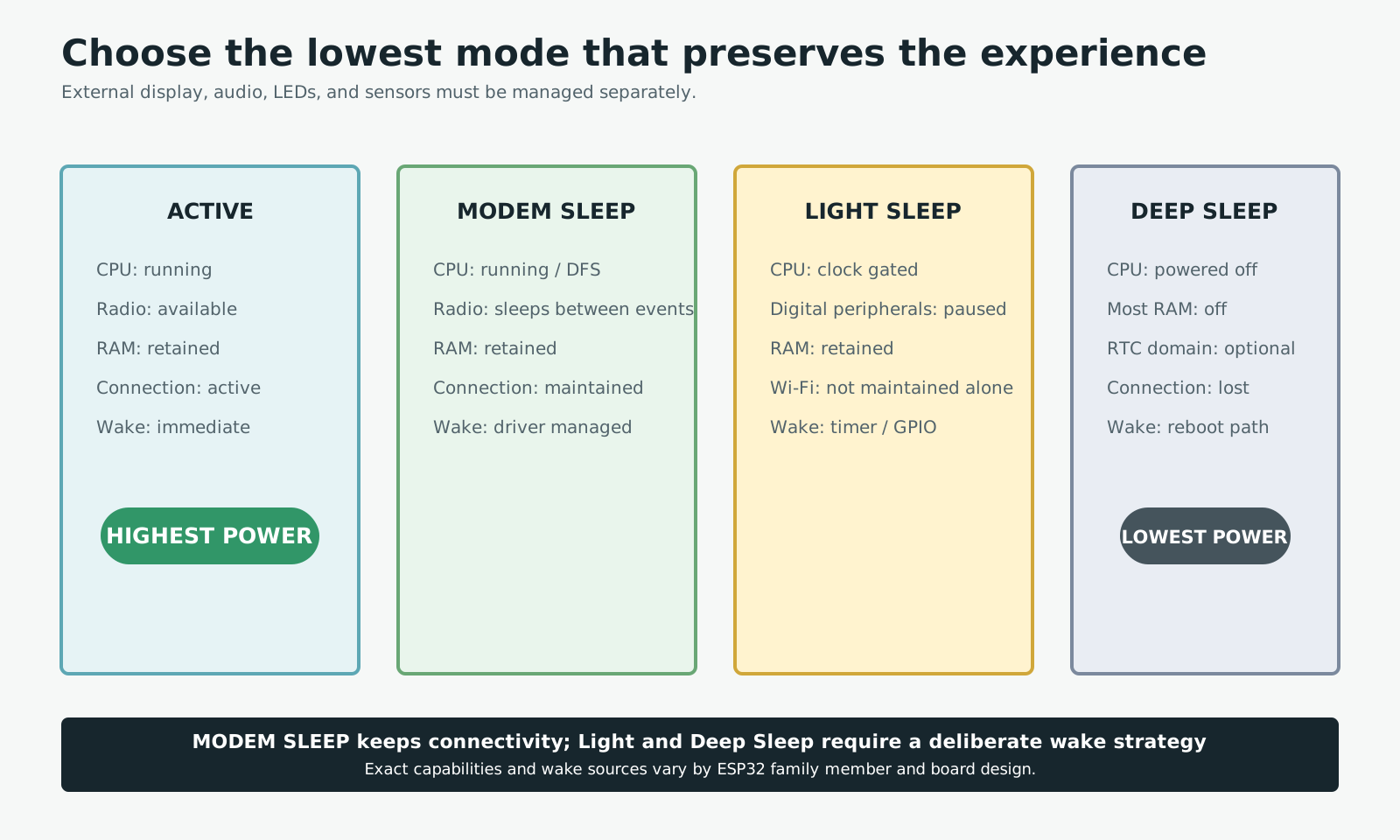
The right mode depends on which connection must remain alive and the acceptable response time.
Timer and GPIO wake sources can be combined, while touch and RTC-pin capabilities vary across ESP32 family members. Confirm the exact chip, board routing, pull resistors, and wake level before committing the hardware.
8. Remove power from unused peripherals
Display modules, microphones, sensors, amplifiers, and decorative LEDs may draw standby current even when firmware stops using them. A load-switch IC or MOSFET can disconnect an entire peripheral rail.
Power gating needs a complete sequence:
- Stop bus transactions.
- Place connected GPIOs low or high-impedance as required.
- Disable the rail.
- On wake, restore the rail and wait for startup.
- Reinitialize the driver before communicating.
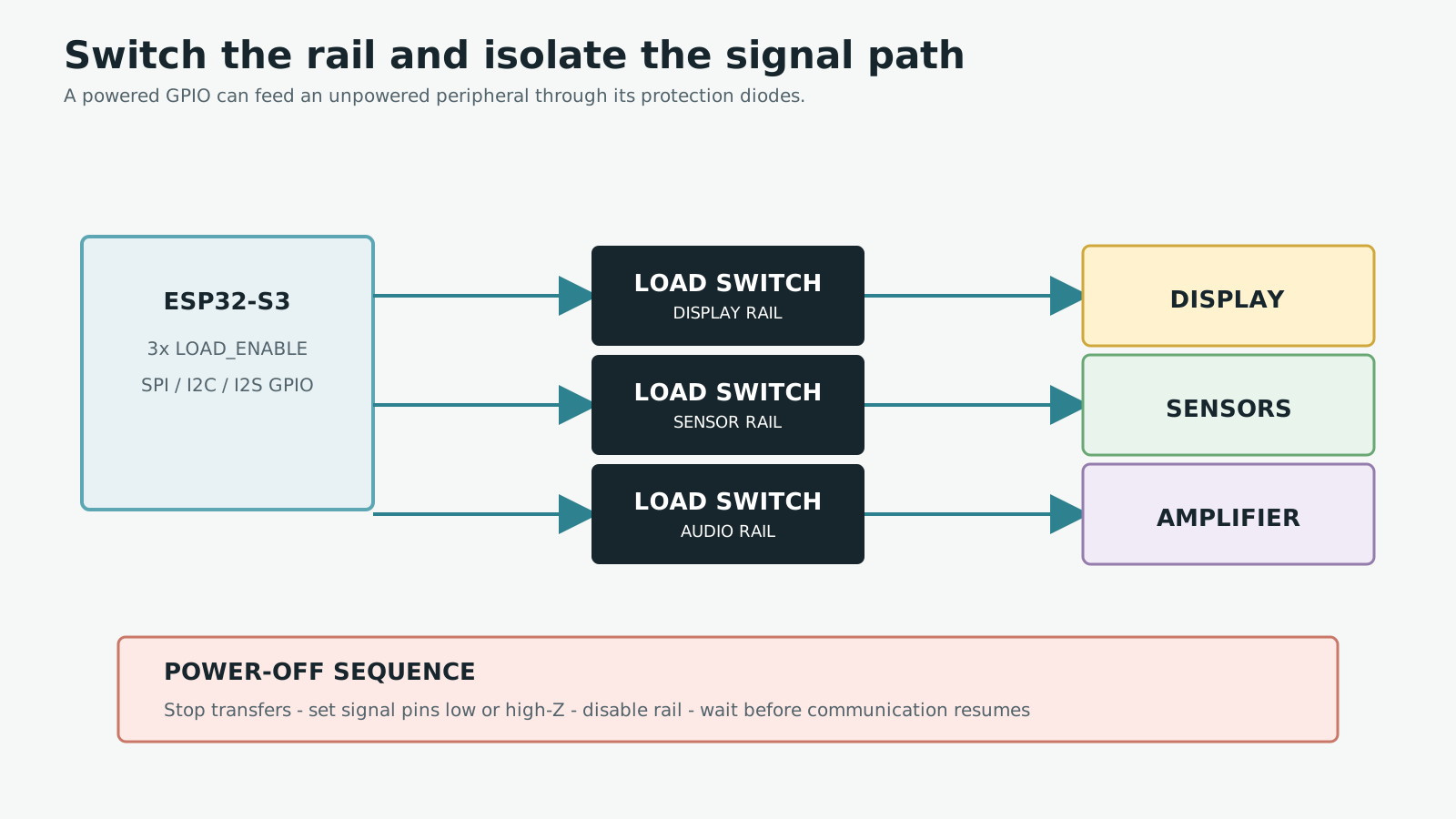
Switching a peripheral rail works only when its signal pins are also placed in safe states.
Leaving a signal pin high can back-power an unpowered device through its input protection diode. This creates unexplained sleep current and can violate absolute maximum ratings. Check SPI, I2C, I2S, UART, interrupt, and reset lines individually.
9. Choose regulators for low-load behavior
When Active current is hundreds of milliamps, a regulator's microamp-level quiescent current seems unimportant. During Deep Sleep it may become the dominant load.
Compare more than maximum output current:
- Quiescent current across the expected input range.
- Shutdown current.
- Dropout voltage or conversion efficiency.
- Efficiency at very light loads.
- Peak-current capability.
- Input/output capacitor and ESR requirements.
Always-on power LEDs can consume more than the sleeping ESP32. Remove them, increase their resistance where appropriate, or drive status indicators from GPIO so they are off during long idle periods.
10. Measure every state
Power optimization without measurement quickly becomes guesswork. Record at least:
- Boot and network connection.
- Full display brightness.
- Wi-Fi idle and active transfer.
- Audio playback start and steady playback.
- Product Idle.
- Light Sleep.
- Deep Sleep.
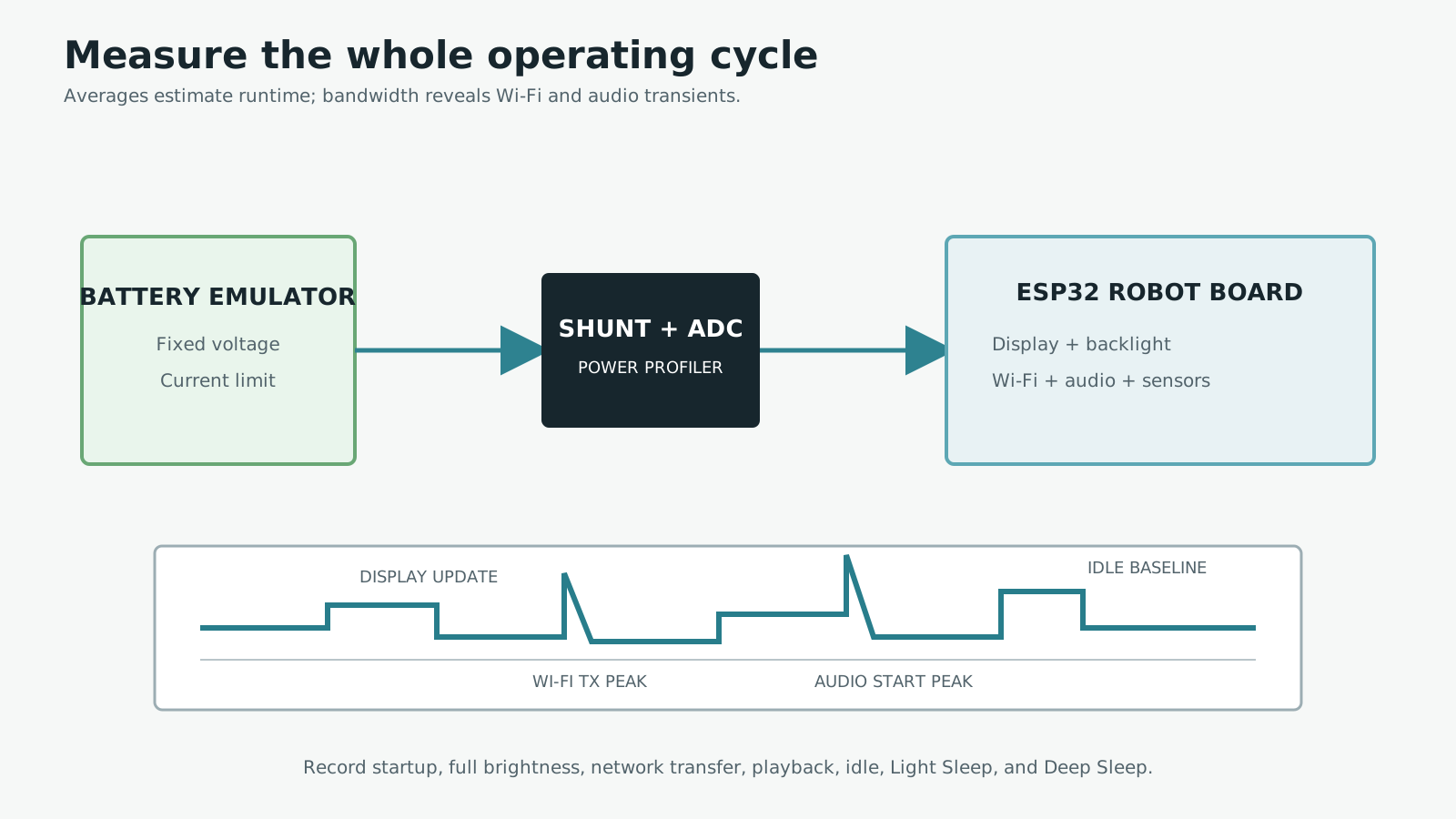
A multimeter shows averages; a profiler or oscilloscope reveals whether the rail survives short load steps.
A multimeter is useful for steady averages, while a USB power meter can help during basic bring-up. A power profiler or shunt plus oscilloscope is better for short Wi-Fi and audio peaks. Measure at the battery or system input when estimating runtime so regulator loss and all peripheral loads are included.
11. Estimate battery runtime from the complete duty cycle
The simplest estimate is:
Battery life (hours) = Battery capacity (mAh) / Average current (mA)
A 1,000mAh battery and a constant 200mA load give five ideal hours. Real runtime is lower because of regulator loss, cutoff voltage, cell temperature, aging, and optimistic capacity ratings. A 70–85% early derating is often more realistic than presenting the ideal result as a promise.
The important input is weighted average current. Consider this operating cycle:
- Active for 10% of the time at 250mA.
- Idle for 30% at 80mA.
- Sleep for 60% at 2mA.
Iavg = 250 x 0.10 + 80 x 0.30 + 2 x 0.60
Iavg = 50.2mA

Ideal runtime = 1000 / 50.2 = 19.9 hours
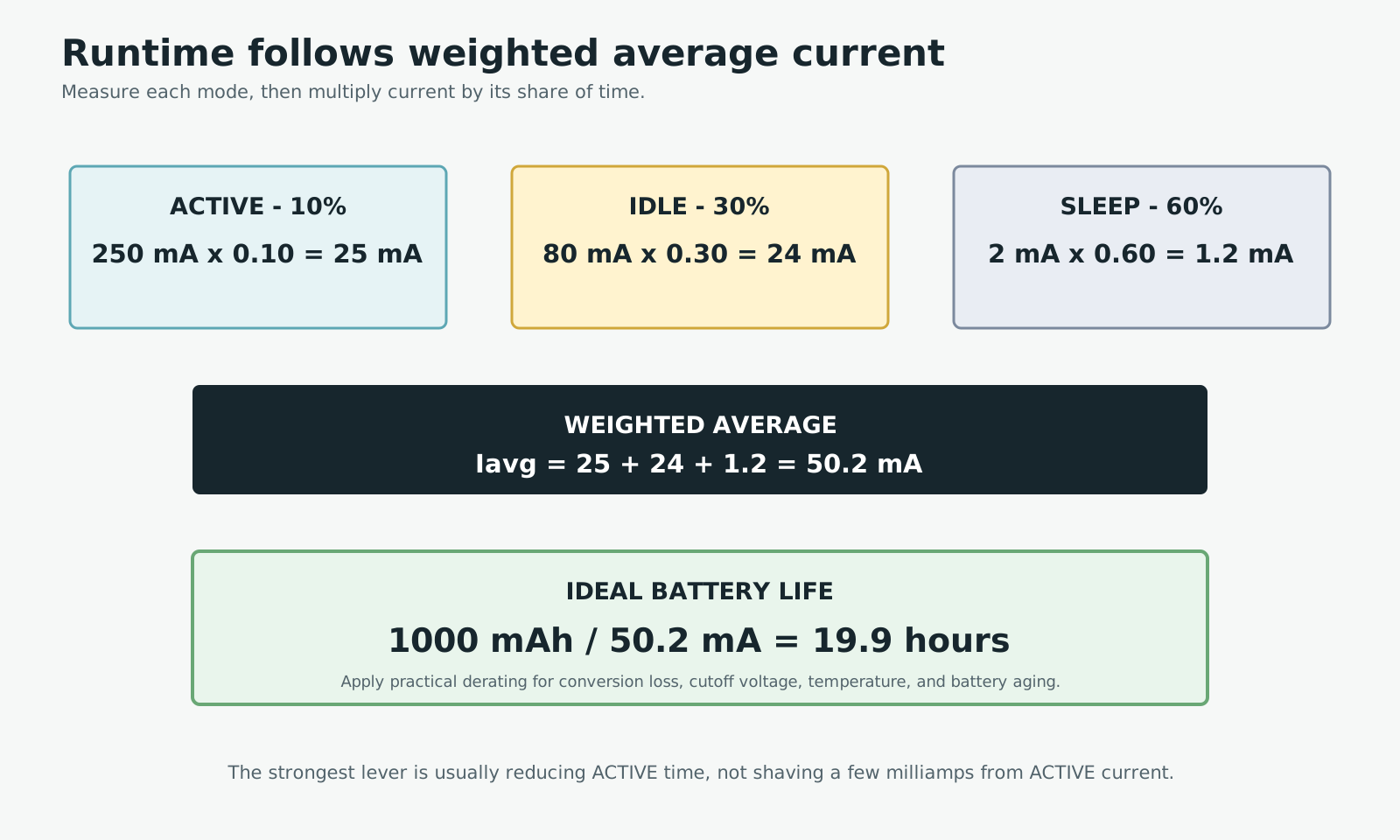
The example gives 50.2mA average and 19.9 hours ideal runtime before practical derating.
This method also shows where engineering effort pays off. If Sleep current is already small, moving more time from Active to Idle or Sleep often helps more than a minor Active-mode optimization.
12. A practical Mochi power policy
One starting policy could be:
While interacting
- Display around 70% brightness.
- Wi-Fi enabled only for API work.
- Amplifier enabled only during playback.
- Animation matched to the current interaction state.
After 30 seconds without interaction
- Dim the display to 20%.
- Reduce animation frame rate.
- Shut down the amplifier.
- Slow non-critical sensor sampling.
After two to five minutes
- Turn the backlight off.
- Stop animation and unnecessary timers.
- Power-gate unused peripherals.
- Enter Light Sleep with button or touch wake-up.
After a longer timeout
- Save only the state needed after reboot.
- Shut down display and peripheral rails.
- Enter Deep Sleep.
- Wake from a button, supported touch input, or timer.
Make these timeouts configurable. A desk companion and a portable sensor have very different expectations about availability and wake latency.
If Mochi already has an emotion state machine, keep the power state as a separate layer that consumes the same interaction events. The Mochi emotion state-machine guide shows how to avoid coupling animations directly to sleep commands. The ESP32-S3 battery power design covers regulators, dropout, charging, and power-path hardware in more detail.
Conclusion
No single change fixes battery life. The useful gains come from combining backlight control, radio duty cycling, amplifier shutdown, slower UI updates, peripheral power gating, appropriate sleep modes, and measurement.
Rather than spending all the effort shaving a small amount from Active current, reduce the time the robot remains Active. That is often the simplest and strongest lever available.
References
Share
Keep exploring
Read next
Related articles
TinyML on ESP32: Running AI on the Device
How I run a small person-detection model on ESP32 with TensorFlow Lite Micro and ESP-NN, from memory limits to testing Espressif's example.
Two-Way I2S Audio on ESP32-S3: I2S Microphone and I2S Speaker
A practical explanation of BCLK, WS, DIN, DOUT, full-duplex audio, sample rate, and buffers when building two-way I2S audio on ESP32-S3.
What Is a MEMS Microphone? From a Silicon Diaphragm to ESP32 Audio
Learn how MEMS microphones work, how analog, PDM, and I2S outputs differ, and how to avoid PCB, power, and acoustic-port mistakes.